ECS and Simple ECS#
ECS stands for Entity-Component-System. Entity contains several components and related system logics. Component is pure data, like velocity, status and so on. System is about pure logic, it is a bunch of status-less functions.
For high performance project, component’s pure data and system’s pure logic feature is important, which helps reduce CPU cache missing and provide cleaner code structure.
However, in some cases, I choose to mix some component (data) and some system (logic) into one single macro component. For example, I’ve got one macro component called MovementComponent, which contains moveSpeed, jumpSpeed, movementStatus data, as well as ExecuteMove(), ExecuteJump() logic.
Let’s say it is Simple ECS, or Component-Based-Design if you like. And starting from here, I use “component” stands for “macro component”.
Why Simple ECS ?#
For example, you wanna make a cat entity. Just pickup these common components: model_comp (handle model and material display), animation_comp (handle cat’s animation), sound_comp (handle meow~), ai_comp (decide where to walk to and what cat’s doing). And finally, you set up cat’s data into these components, like cat’s model resource path, cat’s sound path, the ai behave tree path and animation state machine path.
In this example, all of the components is pre-made and well-designed. So it is easy to make a cat entity. Just put components together and inject some cat’s proprietary config data.
Based on simple ECS, you can make a specific entity at run-time, even this entity is not pre-defined in source code. I mean, if you input the name of needed components and input config data (like a recipe), then the system will just make it for you. This can be called as a class factory design.
With “macro component”, the code reusable flexibility still remains. But performace boost and extreme clean structure from pure ECS design are the cost.
This is a much simple way for code management, I think.
ECS for Godot C##
Godot has node system, and one single node can only be attached by one single script. So it is easy to find out that one node stands for one component. This is my player scene structure:
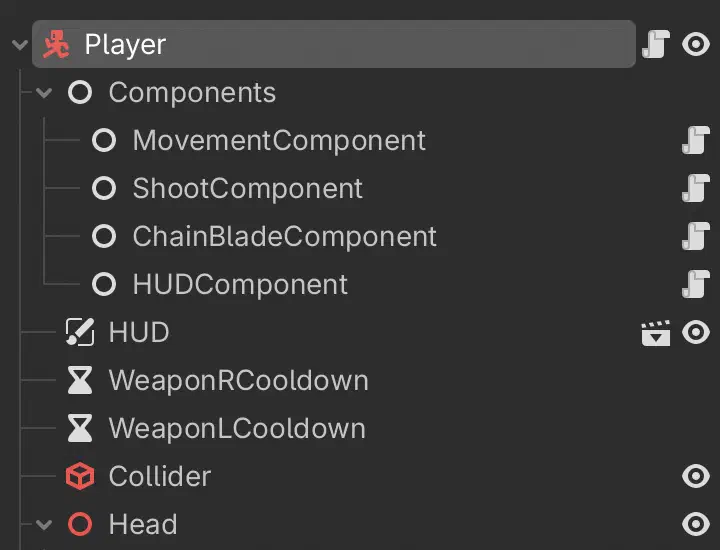
As a FPS player, it need movement, left & right weapons, and HUD components, each component handle its own logic independently for most of the time. When they need to connect with each other, the componnet first call owner entity, and find the other component by the type name.
Now take a look at IEntity and IComponent interfaces.
 1
 2
 3
 4
 5
 6
 7
 8
 9
10
11
12
| public interface IEntity
{
Dictionary<Type, IComponent> Components { get; }
}
public interface IComponent
{
IEntity Entity { get; set; }
void OnComponentAdded();
void OnComponentRemoved();
}
|
And here is the component add & get functions.
 1
 2
 3
 4
 5
 6
 7
 8
 9
10
11
12
13
14
15
16
17
18
19
20
21
22
23
24
25
26
27
28
29
30
31
32
33
34
35
36
37
38
39
40
41
42
43
44
45
46
47
48
49
50
51
52
53
54
55
56
57
58
59
60
61
62
63
64
65
66
67
68
69
70
71
72
73
74
75
76
77
78
79
80
81
82
| public static class EntityExtension
{
public static void AddComponent(this IEntity entity, IComponent component)
{
Type type = component.GetType();
if (entity.HasComponent(type))
{
GD.PrintErr("AddComponent: duplicated components <" + type.Name + ">, remove old one.");
entity.RemoveComponent(type);
}
entity.Components[type] = component;
component.Entity = entity;
component.OnComponentAdded();
}
public static void AddComponent<T>(this IEntity entity, T component) where T : class, IComponent
{
entity.AddComponent((IComponent)component);
}
public static T GetComponent<T>(this IEntity entity) where T : class, IComponent
{
if (entity.Components.TryGetValue(typeof(T), out var component))
{
return (T)component;
}
return null;
}
public static void RemoveComponent(this IEntity entity, Type type)
{
if (entity.Components.TryGetValue(type, out var component))
{
component.OnComponentRemoved();
component.Entity = null;
entity.Components.Remove(type);
}
}
public static void RemoveComponent<T>(this IEntity entity) where T : class, IComponent
{
entity.RemoveComponent(typeof(T));
}
public static bool HasComponent(this IEntity entity, Type type)
{
return entity.Components.ContainsKey(type);
}
public static bool HasComponent<T>(this IEntity entity) where T : class, IComponent
{
return entity.HasComponent(typeof(T));
}
public static void InjectComponents(this IEntity entity)
{
if (entity is not Node entityNode)
{
GD.PrintErr($"InjectComponents: {entity.GetType().Name} is not godot node type");
return;
}
Node componentsNode = entityNode.GetNodeOrNull<Node>("Components");
if (componentsNode is null)
{
GD.PrintErr($"InjectComponents: {entity} has no 'Components' node.");
return;
}
foreach (var child in componentsNode.GetChildren())
{
if (child is IComponent component)
{
entity.AddComponent(component);
}
else
{
GD.PrintErr($"InjectComponents: {entity} has non-component node '{child.Name}' inside 'Components' node.");
}
}
}
}
|
Then if you wanna make a new component, just write like this. TheEntity attribute will be set at entity’s init stage.
 1
 2
 3
 4
 5
 6
 7
 8
 9
10
11
12
13
14
15
16
17
18
19
20
21
22
| public partial class HUDComponent : Node, IComponent
{
// interface
public IEntity Entity { get; set; }
// interface
public void OnComponentAdded()
{
}
public void OnComponentRemoved()
{
}
public override void _Ready()
{
}
public override void _Process(double delta)
{
}
}
|
If you wanna make a new entity, just write like this. Components contains all of the components this entity has, and is easy to debug.
 1
 2
 3
 4
 5
 6
 7
 8
 9
10
11
12
13
14
| public partial class PlayerEntity : CharacterBody3D, IEntity
{
// interface
public Dictionary<Type, IComponent> Components { get; } = new();
public override void _Ready()
{
this.InjectComponents();
}
public override void _Process(double delta)
{
}
}
|
At last, for method-calling between two components, write like this.
1
2
3
| // code inside component
var shootComponent = Entity.GetComponent<ShootComponent>();
shootComponent.ActionAttack();
|